
Representative Telegram photo; not the welcome-message or community settings. Photo: Zulfugar Karimov / Unsplash
Telegram Updates: Welcome Messages और Communities से Group कैसे संभालें?
Technology & SecurityTelegram के नए welcome messages, communities और rich text tools समझें। Coaching, customer groups और छोटे teams के लिए practical examples पढ़ें।
On this page
किसी Telegram group में नए लोग आते ही वही सवाल शुरू हो जाते हैं: rules कहाँ हैं, class कब है और सही document कौन-सा है? हर बार पुराना message ढूँढकर भेजना मेहनत बढ़ाता है। Group बड़ा करने से पहले उसकी जानकारी को पढ़ने योग्य और आसानी से मिलने वाला बनाना ज्यादा उपयोगी हो सकता है।
Telegram के July और August 2026 updates में ऐसे कुछ tools आए हैं जो इस काम में मदद कर सकते हैं। सभी options का मतलब automatic community growth नहीं है। पहले अपने group की जरूरत, members की privacy और admins की जिम्मेदारी तय करें। फिर जो feature उस काम में मदद करे उसे चुनें।
Welcome Message से शुरुआत स्पष्ट रखें
25 August 2026 के official announcement के अनुसार groups और channels में welcome messages लगाए जा सकते हैं, जो joining पर केवल नए member को दिखते हैं। Text के साथ media और कई messages भी जोड़ सकते हैं। Owner के लिए profile के Edit और Welcome Message का रास्ता दिया गया है।
एक coaching group में welcome pack की शुरुआत तीन छोटी बातों से हो सकती है: यह group किसके लिए है, class timing कहाँ मिलेगी और सहायता कैसे माँगें। शुरुआत में लंबी terms की दीवार रखने से जरूरी जानकारी छिप सकती है। किसी link के साथ लिखें कि वह किस काम का है। Member से व्यक्तिगत documents public chat में भेजने को न कहें।
Communities में कौन-से Chats साथ रखें?
14 July 2026 के update में Telegram Communities का विवरण है। Related groups, channels और bots एक community में जोड़े जा सकते हैं। Chats की visibility और दूसरों को chats जोड़ने देने वाले controls भी बताए गए हैं। व्यवस्था बनाते समय उन controls की समीक्षा करें।
मान लीजिए एक training team का announcement channel, सवालों वाला group और course resources का channel है। इन्हें साथ देखने से नए member को रास्ता समझ आ सकता है। लेकिन अलग batches का private discussion बिना जरूरत सबके लिए visible करना ठीक नहीं। पहले chat की audience लिखें, फिर community में उसकी जगह तय करें।
Rich Text और Inline Documents कब उपयोगी हैं?
July release में headings, tables, lists और inline media वाला rich text editor आया। उस announcement में editor Premium users के लिए बताया गया है। August update ने text के बीच documents और files जोड़ने का विकल्प भी समझाया। इसलिए editor को हर free account में उपलब्ध बताकर योजना न बनाएं।
एक course note में heading के बाद छोटा explanation और वहीं संबंधित worksheet देना उपयोगी हो सकता है। File का साफ नाम रखें, जैसे lesson-03-practice, और उसके साथ version या तारीख लिखें। पुराने document और updated document का नाम एक जैसा रखने से confusion बढ़ सकता है। पहले एक test message में layout पढ़कर देखें।
Buttons और Bots में फर्क समझें
August announcement में developers के लिए message के अंदर interactive buttons और automated flows बताए गए हैं। यह हर member के लिए सामान्य typing button वाला feature मान लेना सही नहीं है। कुछ flows के लिए coding या bot development की जरूरत होती है।
यदि आपके group का उद्देश्य केवल notices देना है तो शुरुआत में working links और welcome message काफी हो सकते हैं। Bot जोड़ने से पहले तय करें कि वह क्या पढ़ेगा, क्या बदलेगा और उसके administrator rights क्यों चाहिए। केवल attractive menu दिखाने के लिए उसे सभी permissions देना जरूरी नहीं है। किसी paid template को खरीदने से पहले छोटे test group में जाँचें।
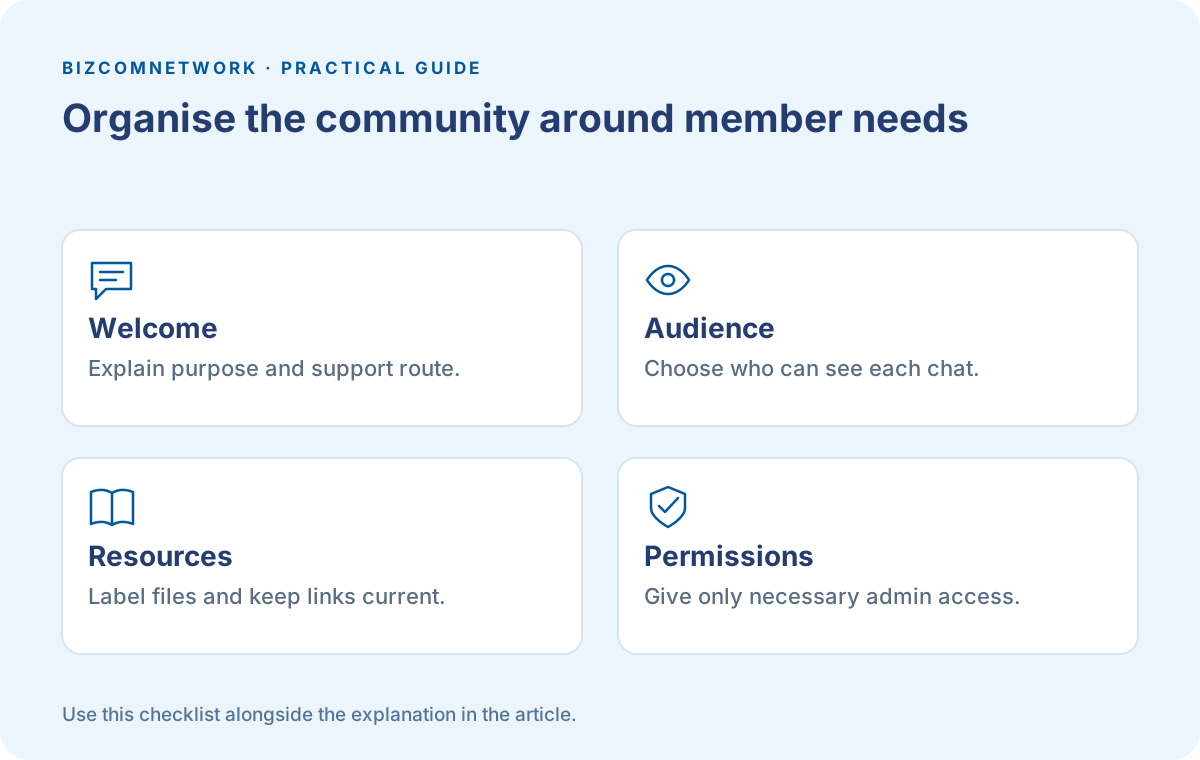
छोटी Admin Checklist बनाएं
हर महीने welcome links, admin list और pinned information देखें। Outdated form या बंद हुई offer नए members को गलत दिशा दे सकती है। शिकायत आने पर member के private details खुले chat में न दोहराएं। Community में कौन-सा chat सहायता के लिए है, यह स्पष्ट रखें।
दो लोग admin हैं तो responsibilities लिखें: announcements कौन बदलेगा, spam कौन देखेगा और पुराने resources की समीक्षा कौन करेगा। Member count से ज्यादा यह देखें कि जरूरी सवाल का उत्तर मिल रहा है या नहीं। नए features आपकी व्यवस्था को बेहतर कर सकते हैं, लेकिन गलत या पुरानी जानकारी को अपने आप सही नहीं करते।
Frequently Asked Questions
क्या Welcome Message के लिए Bot जरूरी है?
Official August update में owner के लिए built-in welcome message का तरीका दिया गया है। Custom interactive flows अलग development मांग सकते हैं।
क्या Rich Text Editor सभी Free Accounts में मिलेगा?
July announcement ने इसे Premium users के लिए बताया था। अपने current app और official availability देखें।
क्या Community में हर Chat सबको दिखती है?
Visibility और membership controls हैं। Group जोड़ते समय उसकी audience और settings जाँचें।
Article at a glance
- Written by
- Aarav Sharma
- Published
- 12 Oct 2026
- Reading time
- 5 minutes
- Topic
- Technology & Security
Read More Blogs

Top 10 Mobile Repair Shops in Indore: फोन देने से पहले क्या पूछें?
Indore की mobile-repair listings की shortlist। Diagnosis, parts, estimate, job sheet, data privacy और repair के बाद testing के लिए practical guide।
Google AI Search में नए Links: सही Website और Source कैसे पहचानें?
Google AI Search के अक्टूबर update को समझें। Inline links, official pages और news sources को पढ़कर अपना काम सही website पर पूरा करने की Hindi-English guide।

Googlebook क्या है? India में Laptop बदलने से पहले क्या जाँचें
Googlebook के नए laptop announcement को समझें। India availability, app compatibility, accessories और खरीदने से पहले अपने काम की checklist देखें।
Be the first to share your thoughts.
Comments 0