

Representative ordinary eyewear; this is not a Ray-Ban Meta Gen 3 product photo. Photo: Bimbingan Islam / Unsplash
Ray-Ban Meta Gen 3 India: AI Glasses खरीदने से पहले 6 Checks
Technology & SecurityRay-Ban Meta Gen 3 के India announcement को समझें। Fit, camera, battery, AI availability और service की buying checklist आसान हिन्दी में पढ़ें।
On this page
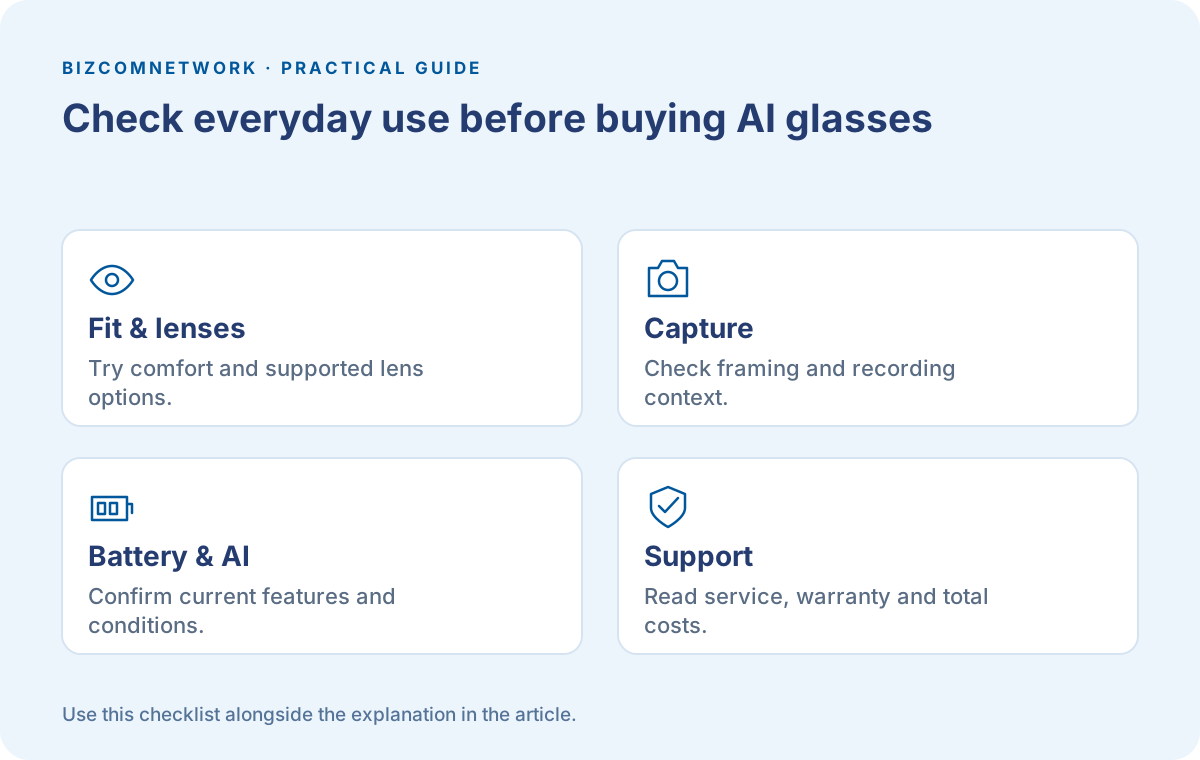
Phone निकाले बिना photo लेना या call करना सुविधाजनक लग सकता है। लेकिन ऐसा gadget जो आप चेहरे पर कई घंटे पहनेंगे, उसकी खरीद में केवल camera specification काफी नहीं है। Fit, lenses और आसपास के लोगों की privacy आपके रोज के experience का हिस्सा होंगे। AI glasses का फैसला अपने वास्तविक use case से शुरू करें।
Meta ने 1 October 2026 के India announcement में Ray-Ban Meta Gen 3 की उपलब्धता बताई। उसी release में Ray-Ban Meta Audio और glasses पर Muse को आने वाला कहा गया है। आज उपलब्ध Gen 3 और future features को एक ही मानकर खरीद का निर्णय न लें। यह announcement आधारित guide है, हमारा hands-on review नहीं।
1. Frame का Fit पहले जाँचें
Official विवरण में Gen 3 के slimmer design और adjustable temple tips का उल्लेख है। आपके लिए comfortable है या नहीं, यह पहनकर जाँचना होगा। कान के पास pressure, nose fit और नीचे देखते समय frame की स्थिति पर ध्यान दें। दुकान में एक मिनट पहनना पूरे दिन के comfort का तय प्रमाण नहीं है।
Prescription lenses चाहिए तो authorised provider से supported options, fitting और कुल खर्च पूछें। केवल internet पर दिखा frame अपने prescription के लिए suitable है, ऐसा मानकर order न करें। Lens replacement और warranty की conditions भी साथ पढ़ें।
2. Camera अपने काम के हिसाब से देखें
Announcement में 12 MP camera और 3K Ultra HD video recording बताई गई है। Numbers सुनकर अपने phone से हर परिस्थिति में बेहतर तस्वीर मिलने की उम्मीद न बनाएं। यदि उपलब्ध demo की अनुमति है तो उस तरह के scenes देखें जिनके लिए आप glasses लेना चाहते हैं।
Family event, outdoor walk और product detail दिखाने की जरूरत अलग है। Lighting, framing और आवाज की clarity देखना उपयोगी होगा। Hands-free capture का फायदा तभी है जब recording में वास्तव में वही दिखे जो आप दिखाना चाहते हैं। किसी दुकान या घर के अंदर पहले filming की permission लें।
3. Battery Claim को अपनी Routine से जोड़ें
Gen 3 के लिए official release में up to nine hours battery life दी गई है। इसे अपनी calls, recording और other features के साथ guaranteed runtime न मानें। Charging routine, case और travel के दौरान उपलब्ध power पर भी सोचें। आपका रोज का usage specification sheet के example से अलग हो सकता है।
एक छोटी सूची बनाएं: सुबह calls, दोपहर music और कभी video capture। Demo या official documentation से देखें कि आपके important features के लिए क्या conditions हैं। यदि काम के बीच charging संभव नहीं है तो यह जरूरत खरीद से पहले स्पष्ट होनी चाहिए।
4. AI Feature की आज की Availability पूछें
Release में customizable action button और Meta AI तक access का विवरण है। Language, account और region के हिसाब से actual features जाँचें। Future Muse experience और आने वाले Audio model की चर्चा को current Gen 3 में मौजूद हर feature का प्रमाण न मानें।
यदि आपका मुख्य उद्देश्य हिन्दी में particular task करना है तो वही supported experience पूछें। केवल general AI label देखकर उस काम का support मान लेना अधूरा होगा। किसी retailer के verbal promise से ज्यादा official product information और actual available controls देखें।
5. Recording और Privacy की आदत बनाएं
Official announcement glasses में photo या video capture के दौरान लोगों को जानकारी देने वाली LED का उल्लेख करती है। Indicator होना permission लेने की जगह नहीं लेता। Sensitive documents, private conversations और ऐसे places जहाँ photography restricted है, वहाँ विशेष ध्यान दें।
परिवार या customer को बताना आसान है कि आप record कर रहे हैं। किसी की शिकायत पर recording रोकें और परिस्थिति समझें। Captured files share करने से पहले देखें कि उनमें address, screen या कोई private जानकारी तो नहीं है। Social media पर upload अलग फैसला है, केवल capture हो जाना उसका approval नहीं है।
6. कुल Cost और Local Service लिखें
Frame, lens options, accessories और supported service का पूरा खर्च देखें। Launch announcement की कीमत और आज checkout में उपलब्ध price अलग हो सकती है। इसलिए इस guide में किसी पुराने starting price को current offer नहीं कहा गया है। Invoice पर सही model और seller details पढ़ें।
Warranty, return rules और repair support समझें। Imported unit सस्ता दिखता हो तो India support की terms अलग जाँचें। यह एक comparison sheet बनाएगा जिसमें आपके phone या earphones से मिलने वाला existing काम भी लिख सकते हैं। नया gadget आपकी जरूरत का कौन-सा हिस्सा बेहतर करेगा, यह सवाल सबसे उपयोगी है।
Frequently Asked Questions
क्या Gen 3 में Muse वाले सभी Features अभी मिलेंगे?
India announcement ने glasses पर Muse को आने वाला बताया है। खरीद से पहले current official availability देखें।
क्या Up to Nine Hours का मतलब इतना Runtime पक्का है?
नहीं। यह official claim है; actual usage, settings और features से runtime बदल सकता है।
क्या AI Glasses Phone और Earphones का पूरा Replacement हैं?
अपने जरूरी कामों की तुलना करें। Calls, recording, battery और app support की जरूरतें अलग होती हैं; एक नया gadget सभी existing devices का पूरा replacement मानकर न लें।
Article at a glance
- Written by
- Bizcomnetwork
- Published
- 12 Oct 2026
- Reading time
- 5 minutes
- Topic
- Technology & Security
Read More Blogs
Googlebook क्या है? India में Laptop बदलने से पहले क्या जाँचें
Googlebook के नए laptop announcement को समझें। India availability, app compatibility, accessories और खरीदने से पहले अपने काम की checklist देखें।
Fake Job और Task Scams: Online Offer में ये Red Flags देखें
Online नौकरी या paid task offer की जाँच कैसे करें? Upfront payments, company verification, evidence और India में cyber reporting की practical Hindi-English guide।
WhatsApp Guest Calling: बिना Account वाले व्यक्ति को Call में कैसे बुलाएं?
WhatsApp के नए Guest Calling update में call link, browser joining और host approval कैसे काम करते हैं? Meeting तैयार करने की practical Hindi-English guide।
Be the first to share your thoughts.
Comments 0